
Paying with SEPA (Single Euro Payment Area)
SEPA allows you to pay directly from your European bank account.
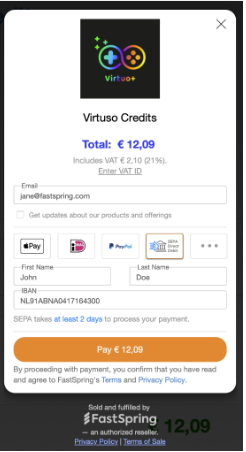
Follow these steps to complete your payment:
Payment Screen
- Enter your email address.
- Select SEPA from the list of available payment methods.
- Enter your first and last name.
- Provide your personal or company IBAN (found in your banking app or on your paper statement).
- Click Pay.
Order Placed Screen

- If you need an invoice for accounting purposes, select View Invoice to download it.
- To confirm your details for recurring payments, select View Mandate.
Paying with ACH (Automated Clearing House)
ACH Direct Debit allows you to pay directly from your U.S. bank account.
Follow these steps to complete your payment:

Payment Screen
- Enter your email address.
- Select ACH Direct Debit from the list of available payment methods.
- Enter your first and last name.
- Choose the type of bank account being used for payment (from the dropdown menu).
- Enter your ACH account details (found in your banking app or on a paper statement).
- Enter your ZIP code.
- Check the box to authorize the payment.
- Click Pay.
Account Confirmation Screen
- Review your account details to confirm accuracy.
- Click Confirm.
Order Placed Screen
Your order is now complete.
- If you need an invoice for accounting purposes, select View Invoice to download it.
- To confirm your details for recurring payments, select View Mandate.